Status: the standard. This documents the live case study style exactly as built on branch case-studies (commit f2fae19, Peter's original Figma colours, Sense-style spacing, sticky sidebar). Every value was read with getComputedStyle from the live Hanna page (/case-studies/the-hanna-agri-sports/) at 1366×650 and 1920×950 on 13 Oct 2026. New pages should reuse these classes and values; do not invent new ones.
Source CSS: custom-style.css (legacy theme + Averta CY), css/case-studies.css (case study layer), css/site-chrome.css (header/footer). Live reference page: /style-guide/.
0. Hard rules (site-wide)
0.1 One screen per fold
Every fold on every page must fit one screen at 1440×800. With the 80–84px site header a section's content gets about 716px, and no section may be taller than 800px. Measure every new or changed section at 1440×800 before shipping; anything taller gets cut, split or redesigned. On phones (390 wide) aim for one screen too, using scroll-snap rows or tap-to-reveal instead of long stacks.
0.2 Highlight panel: the standard way to highlight key information
Use template-parts/site/highlight-panel.php (CSS css/highlight-panel.css, loaded site-wide) for any short list of key points. 2–6 short lines, one optional punchline, one panel per fold. Do not invent new callout boxes.
get_template_part( 'template-parts/site/highlight-panel', null, array(
	'lines'     => array( 'No more surprise bills.', 'No more paying for empty rooms.', ... ),
	'punchline' => 'The goal isn’t more work for you. It’s fewer surprises.',
	'cols'      => 2, // or 1
) );
Highlight panel (the standard key-information highlight)get_template_part( 'template-parts/site/highlight-panel', null, $args )
No more surprise bills.
No more paying for empty rooms.
No more emergency repairs.
No more digging through bills for answers.
The goal isn’t more work for you. It’s fewer surprises.
1. Fonts
Family
Source
Weights in use
Used for
Averta CY
Self-hosted, font2/ (custom-style.css @font-face)
400, 500, 600 (all served by the Semibold file) and 700 (Bold file)
All case study content: hero, cards, body, lists, quotes, stats, Facility Background, Energy Loss, buttons in the content
Plus Jakarta Sans
Google Fonts
500, 600, 700 (400–800 loaded)
Header / nav, sidebar cards (title, text, pills, button), slider title and subtitle band
Count of rendered text elements on the Hanna page: Averta CY 400 ×62, 700 ×41, 600 ×20, 500 ×1; Plus Jakarta Sans 700 ×9, 500 ×2, 600 ×1.
Note: Averta CY only ships Semibold and Bold, so "400" and "600" Averta text look the same weight; real contrast comes from 700.
2. Type scale
Sizes scale fluidly between the two widths (tokens --r-h1: clamp(40px, 3.2vw, 56px), --r-h2: clamp(32px, 2.6vw, 44px), --r-h3: clamp(24px, 1.8vw, 30px), --r-body: 16px → 18px at ≥1920, --r-lead: 18px → 20px, --r-lh: 1.7, --r-cap: 14px).
Role
Selector
Family
Size px (1366 / 1920)
Weight
Line-height px (1366 / 1920)
Tracking
Colour
Hero H1
.csd-hero h1
Averta CY
43.7 / 56
700
49 / 62.7
-1.2px
#0F1E28
Section H2 ("Energy Loss Types Explained", "Smarter Energy Usage")
.csd-loss__title, .csd-usage__title
Averta CY
35.5 / 44
700
40.8 / 50.6
-1px
#1A1C27
Card title ("The Problem", "Why it Matters")
.csd-card__title
Averta CY
24.6 / 30
700
29.5 / 36
-0.5px
#0F1E28
Facility Background title
.hanna-title
Averta CY
22 / 24
700
27.5 / 30
-0.4px
#0F1E28
Overview label ("Case Study Overview")
.csd-hero .bg-border h3
Averta CY
24.5 / 24.5
500
29.4 / 29.4
0
#0F1E28
Card subtitle (accent words inside)
.csd-card__subtitle
Averta CY
18 / 20
600
27.9 / 31
0
#1A1C27
Card subtitle accent word
.csd-card__subtitle span[style]
Averta CY
18 / 20
600
27.9 / 31
0
#FF7F27
Why it Matters subtitle
.csd-matters__subtitle
Averta CY
18 / 20
400
27.9 / 31
0
#0F1E28
Body / intro paragraph
.csd-rich p, .csd-intro p
Averta CY
16 / 18
400
27.2 / 30.6
0
#3B3F59
Body emphasis
.csd-rich .cs-semi
Averta CY
16 / 18
700
27.2 / 30.6
0
#3B3F59
Quote block text
.cs-callout
Averta CY
16 / 18
400
27.2 / 30.6
0
#3B3F59
List item
.csd-rich li
Averta CY
16 / 18
400
27.2 / 30.6
0
#3B3F59
Energy Loss card title
.csd-type title
Averta CY
20.5 / 24
600
25.6 / 30
0
#1A1C27
Slider title
.csd-slide__title
Plus Jakarta Sans
24.6 / 30
700
29.5 / 36
-0.3px
#0D1758
Slider subtitle band
.csd-slide__sub
Plus Jakarta Sans
18 / 20
700
27 / 30
0
#0F1E28
Sidebar title
.csd-side__title
Plus Jakarta Sans
20.1 / 22
600
26.2 / 28.6
-0.3px
#14171C
Sidebar text
.csd-side__text
Plus Jakarta Sans
15 / 15
500
24.8 / 24.8
0
#1C2838
Sidebar check pill
.csd-side__pills li
Plus Jakarta Sans
13 / 14
500
21.3 / 23
0
#14171C
Stat label (hero)
.csd-hero .stat-label
Averta CY
14 / 14
600
18.2 / 18.2
0
#68739B
Facility label
.hanna-label
Averta CY
13 / 13
600
16.9 / 16.9
0
#555967
Facility value
.hanna-value
Averta CY
16 / 17
700
20.8 / 22.1
0
#202231
Usage stat label
.csd-usage__stats p
Averta CY
13 / 13
400
18.2 / 18.2
0
#0D1758 @ 60%
Bar label
.csd-bar__label
Averta CY
15 / 15
400
18 / 18
0
#1A1C27
Stat number (hero row)
.csd-hero .stat-number
Averta CY
20 / 20
700
20 / 20
0
#469E7E
Stat unit "Years" (hero)
.csd-hero .stat-unit
Averta CY
11 / 11
400
11 / 11
0
#069DE3
Stat "%" (hero)
.csd-hero .percent
Averta CY
16 / 16
400
16 / 16
0
#469E7E
Stat number (Smarter Energy Usage)
.csd-usage__v b
Averta CY
40 / 40
700
49.6 / 49.6
0
#4A9A77
Stat number (81 loss areas)
.csd-loss__count b
Averta CY
34.1 / 48
700
42.3 / 59.5
0
#FF7F27
Button: dark pill
.csd-slide__btn
Averta CY
14 / 20
700
19.6 / 28
0
#FFFFFF
Button: green pill
.csd-side__btn
Plus Jakarta Sans
15.6 / 16
700
23.4 / 24
0.2px
#FFFFFF
3. Colours
3.1 Text and surfaces
Hex
Role / where used
#0F1E28
Heading ink: hero H1, card titles, Facility title, Why it Matters subtitle, slider subtitle; dark button fill (.csd-slide__btn)
#1A1C27
Secondary heading ink: card subtitles, section H2s, Energy Loss titles, bar labels
#0D1758
Navy: slider title; base of all hairlines (#0D1758 @ 12%), labels at 60%, dot buttons at 20%
#3B3F59
Body text, lists, quote text, .cs-semi emphasis; slider arrow border
#202231
Facility Background values
#555967
Facility Background labels
#68739B
Hero stat labels
#14171C / #1C2838
Sidebar title / sidebar text
#FFFFFF
Cards, sidebar card, loss summary, bar tracks, button text
#F7F8FC
Facility Background rows
#FAFAFA
Donut chart panel
#0D1758 @ 12%
Standard 1px hairline: .csd-rule, card hr, logo divider lines, loss summary / detected borders
#DCE0E9
Facility Background card border (#D9DCE4 its divider)
#E1E3EF
Sidebar card border
#EBEBEB
Slider card border
#0B121A
Header bar
3.2 Brand / accent colours
Hex
Name
Where used
#6285FB
Periwinkle
Hero H1 accent words, overview bar left rule (+ 8% tint fill), active slider dot, slider arrows, Impact icon tint (8%)
#1FAB3D
Energy green
Why it Matters card border (50%), Why it Matters callout rule and accent words, "Smarter" in Smarter Energy Usage
#58AE6A
Sidebar green
Sidebar "Get my Report" button; 12% for check pills, 8% for the report card fill
#4A9A77
Usage green
Smarter Energy Usage stat (14.7%), Why it Matters icon tint (8%)
#469E7E
Stat green
Hero stat "14.7 %"
#069DE3
Stat sky
Hero stat unit "Years"
#00A2E8
Sky
Slider subtitle left rule (4px), bold words in slider body
3.3 Story card accents (one colour per card)
Card
Accent (subtitle words, border @ 50%)
Body emphasis + quote rule
Icon badge fill
The Problem
#FF7F27 orange
#FF7F27 words, #F0911D rule
#FEF8EA
The Discovery
#98C355 green
#98C355
#98C355 @ 8%
The Impact
#8A38F5 purple
#9747FF
#6285FB @ 8%
The Shift
#03A6F0 sky
#03A6F0
#4DAAE8 @ 8%
Why it Matters
#1FAB3D green
#1FAB3D
#4A9A77 @ 8%
3.4 Energy Loss type colours (cards tint 4–6%, bar track 8%, bar fill 100%)
Type
Hex
Off-Hours Waste
#061C36
On-Hours Overusage
#C2181D
Standby / Idle Loads
#4F5B67
High Continuous Loads
#5D0E0A
"81" loss-area count
#FF7F27
3.5 Accent-word rule
Each card has one accent colour. Use it for the card's 1px border (50% opacity), the icon badge tint, the accent words in the subtitle, the bold .cs-semi phrases in its body, and the 3px quote-block rule. Never mix two accent colours inside one card.
Accent words keep the same size and weight as the surrounding text (subtitle 600, body emphasis 700); only the colour changes.
One accent phrase per subtitle (2–4 words, usually the payoff: "Not The Cause", "Found", "The Waste", "Operational Visibility").
Headings: hero H1 and section H2 may colour their final phrase (periwinkle in the hero, green for "Smarter"). Body copy stays #3B3F59.
4. Components (live on /style-guide/ with the real classes)
3 columns; icon 27px + number 20/700; unit 11px; label 14/600 #68739B
Facility Background
.hanna-card › header row (40px icon badge + 12px gap + 22px .hanna-title, one line, vertically centred, badge left edge = row boxes; same pattern as .csd-card__titlebar) + .hanna-divider + .hanna-item rows (label, value, icon right); last row is a 2-up grid (Age, Size)
Top-aligned with the Case Study Overview bar (both 8px from the column top); columns calc(50% − 28px) each, 56px gap (572px wide at 1366 and 1920). Card 1px #DCE0E9, radius 24, padding 24 (28 at ≥1920); divider 18px above and below; rows #F7F8FC, radius 14, min-height 60, padding 10 52 10 18, gap 10; row icons 22px, right 16, vertically centred
Sidebar cards
.csd-side__card (title, text, .csd-side__pills) and .csd-side__report (image, text, .csd-side__btn)
Pills radius 100; dark #0F1E28/white, 14 → 20px 700, padding 14×28 → 20×40; green #58AE6A/white, Plus Jakarta 700 15.6 → 16, height clamp(48px, 3.33vw, 64px)
Slider arrows / dots
.csd-slider__arrow, .csd-slider__dots
Arrow 56px circle, 1px #3B3F59; active dot 24×8 #6285FB, inactive navy @ 20%
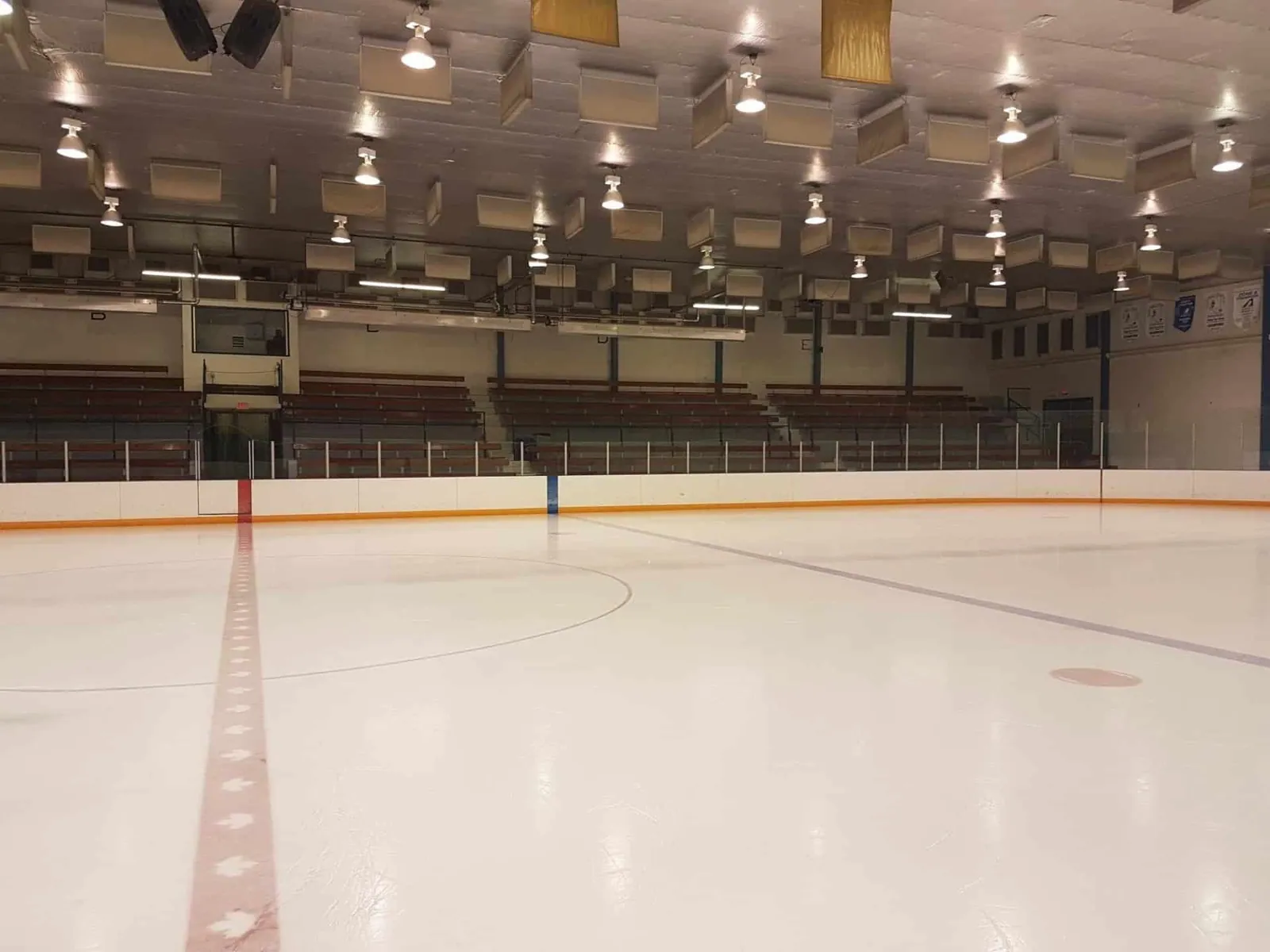
The facility was receiving large monthly utility bills, but there was little visibility into what was actually driving them.
Arena systems
Pool equipment
Lighting
Ventilation
Pumps
And support infrastructure were all operating across different schedules and conditions.
Staff couldn’t clearly see which systems were consuming the most energy, where waste was occurring, or how much operational behavior was impacting costs day after day.
Image-over-cards layoutsection.csd-story
The Impact
The Waste Was Bigger Than Anyone Expected
The findings changed how the facility understood its operations. A significant share of total energy use was occurring while the facility was closed.
Loads continued overnight, systems operated longer than necessary, and unnecessary consumption quietly accumulated month after month.
The issue wasn’t just high energy use — it was invisible operational waste driving costs higher behind the scenes.
The Shift
Operational Visibility Replaced Guesswork
Instead of relying on monthly totals and guesswork, the facility could finally see how systems were operating in real time.
Patterns became obvious.
Waste became measurable.
Decisions became more targeted and operationally focused.
The Hanna Agri-Sports Complex shifted from reacting to utility bills to understanding what was actually happening inside the facility day-to-day.
Logo divider.csd-divider
Why it Matters + Smarter Energy Usage.csd-matters
Why it Matters
Utility Bills Show Totals — Not the Story Behind Them
Most facilities already have data. What they lack is visibility.
Opti-mized transforms electrical infrastructure into operational intelligence by revealing how facilities actually behave in real time.
This isn’t just another dashboard showing numbers.
It’s a different way to understand facilities, uncover hidden operational waste, and identify where energy is truly being lost.
Smarter Energy Usage
14.7%
Energy Savings
2.3Years
ROI Period
81
Energy Loss Areas
Energy Loss cards.csd-loss
Energy Loss Types Explained
81Areas of Energy Loss
Opti-mized detected 81 instances of energy loss across four main categories. Each represents hidden costs that add up quickly.
Energy Loss Detected
Off-Hours:
On-Hours Overusage:
Standby / Idle:
High Continuous Loads:
Off-Hours Waste
Energy used when facilities are closed or unoccupied — systems left running overnight, on weekends, or during downtime.
On-Hours Overusage
Extra energy consumed during regular operating hours — systems drawing more power than necessary for the activity taking place.
Standby / Idle Loads
Power used by systems that remain on or in standby mode even when they’re not actively being used.
High Continuous Loads
Systems that run at high levels for long stretches without adjustment, even when demand is lower.
max-width 1535 (content-box), side padding 24, margin-top 80 (--r-section)
same
Sidebar ↔ main gap
45.5
64
Sidebar width
clamp(290px, 21.46vw, 412px) → 293
412
Main column width
979
1059
Gap between sections (.csd-main)
80
80
Card padding (--r-pad)
40
40
Gap between paired cards (--r-gap)
32
32
Gap inside a card
28
28
Paragraph gap (--r-pgap)
20
20
Text measure
68ch
68ch
Hero H1 → content
32
32
Hero overview ↔ Facility card
56 gap, two equal columns
56
Radius: photo 40 · slider card 32 · story / Why it Matters card 28 · Facility card, Energy Loss cards, usage card 24 · sidebar card ≈23 · report card 18 · bar tracks 16 · Facility rows 15 · quote block 0 12 12 0 · pills, buttons, icon badges 100 (full).
Borders: 1px everywhere (accent @ 50% on story cards, navy @ 12% hairlines, #DCE0E9, #E1E3EF, #EBEBEB); 3px quote rule; 4px slider-subtitle rule.
Shadows: none on cards. The only shadow is on bar fills: 0 3px 24px 4px rgba(13,23,88,.08).
6. Responsive rules
Breakpoint
Behaviour
≥ 1920
Body 18px / lead 20px; headings reach clamp maxima (H1 56, H2 44, card title 30)
≥ 1600 (and height > 820)
Full header; sidebar sticky offset --csd-head: 134px (116px below 1440)
1200–1599, or any width ≥ 1200 with height ≤ 820
Compact 72px header, body padding-top 88, --csd-head: 88px
≤ 1199
Sidebar hidden (its CTA repeats in the report section); story cards overlap −160px
≤ 991
Hero columns and story cards stack; overlap −80px
≤ 767
Section gap 40; overlap −48px; mobile type steps
≤ 380
Small-phone tweaks
Sticky sidebar on short screens (≥ 1200 wide):.csd-side__sticky uses top: calc(var(--csd-head) + 8px) and max-height: calc(100vh − var(--csd-head) − 16px), with a hidden scrollbar. Sizes inside are capped with min(…, vh) so everything fits. At height ≤ 1100 the report card turns horizontal (small image beside the text); at ≤ 700 the check pills are hidden; at ≤ 560 the report image is hidden. html, body use overflow-x: clip (not hidden) so sticky keeps working. Measured: 1366×650 sidebar pinned at 96–475px.
7. Approved Hanna standards (Oct 2026)
Approved by Peter on the Hanna page (/case-studies/the-hanna-agri-sports/, commits 105d3fe → f233017). Hanna gets them through per-slug defaults (opti_cs_slug_defaults() in inc/case-studies.php). The other case studies are not changed yet. Values below are copied from css/ov-concepts.css, css/fold-preview.css, css/fb-logo-preview.css and css/case-studies.css.
15px / 600, on the number's baseline (display:flex; align-items:baseline; gap:4px); % margin-left -2px, Years -1px
Label .ov-lbl
14px / 600 / 1.3, #68739B
Colours
green #469E7E · blue #069DE3 · orange #FF782F (tints at 8%)
Green ring fix: the savings ring is an inline SVG, not a CSS conic-gradient (the gradient rendered soft and off-colour). viewBox 0 0 28 28, r=11, stroke width 4; track #469E7E at stroke-opacity .3 (stronger than the old #E3EEE9); arc #469E7E, stroke-linecap:round, stroke-dasharray = 2πr × % / 100, rotated −90° so it starts at 12 o'clock. It sits in the same fixed 32px icon box as the ROI and loss icons, so all three tiles line up.
7.2 Energy Loss: 2×2 grid in one fold (.cs-fold-b, ≥ 1200px)
14px / 600, align-self:baseline (no offsets, no top) so it sits on the number's baseline
Label p
12px, centred
7.5 Facility Background card
Keep Peter's original card, row design and icons. Only the sizing is compact (css/case-studies.css): card padding 24 (28 at ≥1920), header badge 40×40 with gap 12, title 22px / 1.25 / -0.4px, divider margin 18 0, rows min-height 60, padding 10 52 10 18, radius 14, gap 10; label 13px / 600 #555967; value 16px / 700 #202231 (17 at ≥1920); row icons 22×22, right 16, vertically centred.
Client logo (Logo C): the client's logo replaces the Organization row icon. Files: images/case-studies/<slug>/<org>-logo.png (transparent PNG, ≥ 2× display size), found by opti_cs_org_logo(). CSS (css/fb-logo-preview.css): that row gets .hanna-item--logo with padding-right 120; the logo is absolute, right 14, vertically centred, height 38px, width auto.
7.6 Photos
Always use the highest-res source. Check the Figma frame's image fills first (Figma MCP download_assets → rawImages); Hanna's arena photo was 2752×1316 in Figma vs 1024×490 in the theme.
Export at 2× the display size for retina (Hanna story photo: 2048×704 for a ~980px slot).
Crop out baked-in dark/black bands rather than hiding them with object-fit.
Light sharpen only: Lanczos resize, then an unsharp mask of about radius 1, amount 40%, threshold 3. No visible halos. JPEG quality around 88, progressive.
Naming: photo-N.jpg original, photo-N-crop.jpg band removed, photo-N-sharp.jpg high-res final.
7.7 Sticky sidebar
html, body { overflow-x: clip !important; overflow-y: visible !important; }. Never overflow-x: hidden: it makes body a scroll container and breaks position: sticky.
Height-based sizing: .csd-side__sticky { top: calc(var(--csd-head) + 8px); max-height: calc(100vh - var(--csd-head) - 16px); overflow-y: auto; } with a hidden scrollbar, inner sizes capped with min(clamp(…), …vh), and step-downs at height ≤ 1100 / 700 / 560 (see §6).
8. Lessons learned / tips for other pages
Concepts first. Always show concepts or previews (query toggles such as ?preview=… / ?fb=…, or a concept page) and get Peter's approval before applying anything live.
Keep his original design, colours and icons. Only adjust sizing and positioning.
No muted recolours. Use the brand hexes in §3 as they are, not greyed or desaturated versions.
Test at a laptop viewport of about 1366×650, not just 1920×1080.
Rebuild from the current Figma frames (file OLiQG7hifZbC5eBuGzxqhq), never from old templates.
Check fit within one fold where possible (e.g. the Energy Loss 2×2 grid).
Use the preview-toggle + per-slug-defaults pattern: each concept sits behind a toggle (preview pages are noindex); once approved, add it to opti_cs_slug_defaults() for that slug only. Then confirm the other pages' HTML is byte-identical before and after.
Roll out to one page first (Hanna), fine-tune it, then roll out to the rest.
Watch for Figma typos (e.g. "SmartSence") and fix them in the copy, not just copy them.
Keep Sense-style roomy spacing (§5): don't cram to fit; compact sizing only where a fold target needs it.
9. Overview cards (/case-studies/)
Approved Oct 2026. Markup: template-parts/case-study/card.php. CSS: css/ov-cards-preview.css (loaded on the overview page; body.cs-ov-cards). Figma reference: overview card node 5009:11300 (27px icon beside a 27px number on a 490px card).
Part
Value
Stat icons (ring, ROI, loss) .cs-card__value > img
22×22 (default / 1366), 24×24 at ≥1600, 27×27 at ≥1920; object-fit:contain; gap to number 6px
Numbers / units / labels
unchanged from the card CSS in css/case-studies.css
Hover state (.cs-card__hover, absolute overlay filling the card, same radius). The whole card is the link.
Part
Value
Card
background #15171C, padding 32, column gap 20, left-aligned
Title .cs-card__htitle
Averta CY 700, 22px / 1.32, #FFFFFF (the card title)
Dividers .cs-card__hrule
1px, rgba(255,255,255,.16); the second one pushed to the bottom (margin-top:auto)
Description .cs-card__hdesc
Averta CY 600, 16px / 1.6, #FFFFFF; text from the Figma overview card (opti_cs_card_desc())
Button .cs-card__more "Read More"
outlined pill, right-aligned: height 48, padding 0 24, 1px #FFFFFF border, radius 100, 600 16px white; on its own hover fills white with #15171C text
Transition
overlay opacity .35s ease; title/description ease up 8px (.35s, description +.05s delay); also shown on :focus-visible; disabled under prefers-reduced-motion
Debug
?preview=cards&hover=1 forces the first card into the hover state (noindex)
Note: Figma has no explicit hover variant; the hover spec follows Peter's approved screenshot. Figma reuses three descriptions (Two Hills = Grande Cache, Respol = Provost, Kent = Meaford).
Stat tiles, option B (live)opti_cs_stat_tiles_html() · .ov-b
Case Study Overview
14.7%
Energy Savings
2.3Years
ROI Period
81
Energy Loss Areas
VIPOpti-mized Insiders
Get insider pricing before anyone else.
Join the Insiders list and our best offers reach you first. People who aren’t on the list pay full price, later.
Subscriber-only discounts[discount]
Early-bird pricingBefore a price goes public
First accessNew hardware and features
Live demo invitesDemos and webinarsPeter to confirm
Money-saving tipsPractical ideas for your facilityPeter to confirm
Product newsWhat’s new, in briefPeter to confirm
Opti-mizedVIPInsider
MemberInsider pass
Claim your Insider pass
Your first members-only offer arrives with your welcome email [welcome offer]
No spam. Unsubscribe in one click. By subscribing you agree to our Terms and Privacy Policy.










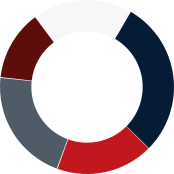
 Off-Hours:
 On-Hours Overusage:
 Standby / Idle:
 High Continuous Loads:


